
Integration
In-depth knowledge
Testing and Go-live
Integrate
Swish via Brite Payments
Swish is a Swedish domestic service that instantly transfer funds between Swedish bank accounts connected to mobile phone numbers.
Swish via Brite
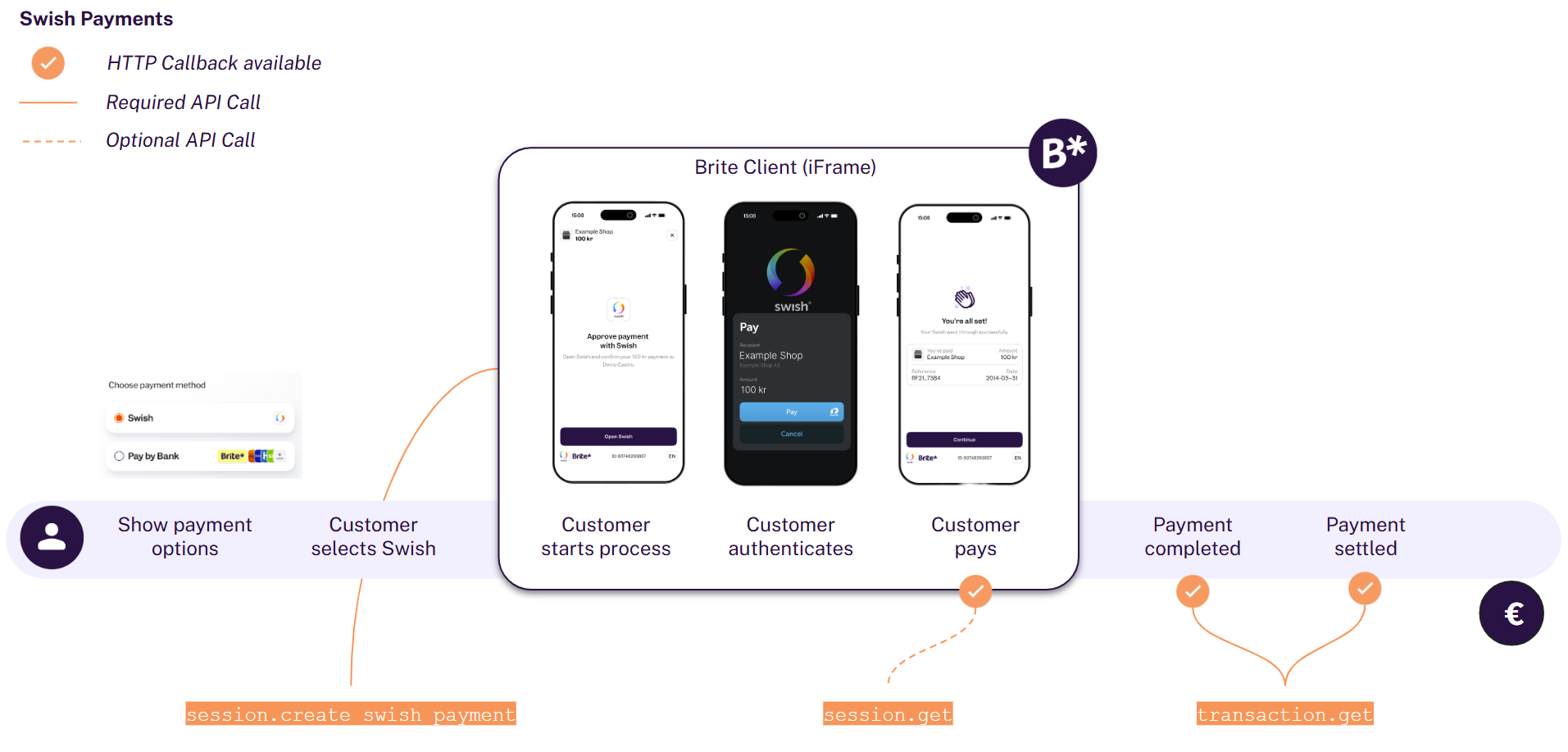
The integration consists of 4 main aspects:
- Display Swish in your checkout
- Create a session for the payment
POST /api/merchant.authorizePOST /api/session.create_iDEAL_payment - Render the client on the front-end
<script>new Brite([token])</script> - Handle session notifications
POST [callbacks[...].url]POST /api/session.get
Brite Instant Payments vs Brite Swish Payments
As such there are a few, but key differences between our regular product and the Swish via Brite product.
- A new API endpoint
/api/session.create_swish_paymenthas been introduced - Swish payments are only available in Sweden, therefore restricting
country_idtoseandcurrency_idtosek - Customers authenticate only via their bank and thus there is no returning user concept on Brite’s side. When creating a new Swish payment no
customer_idis required. - Refunds / Payouts must be handled using Brites Payout functionality without Swish as there is no bank account returned from Swish.
Make sure you have read the “Before your start” information
1. Display iDEAL in your Checkout
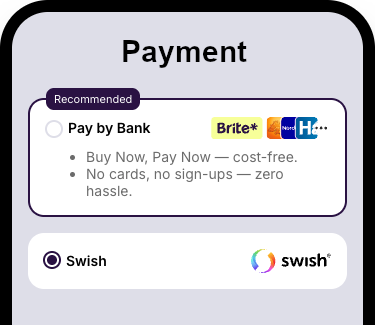
Swish must be presented as its own payment method, even if you also offer Brite Instant Payments.
Swish has their own brand guidelines that need to be followed, both in the checkout and if you include their name or logo elsewhere.
2. Create a session for the payment
Merchant authorisation
POST /api/merchant.authorize
access_token which you add to your requests to the Brite APIs. Request to create a Swish session
POST /api/session.create_swish_payment
					POST /api/session.create_swish_payment HTTP/1.1
Host: sandbox.britepaymentgroup.com
Content-Type: application/json
Authorization: Bearer <YOUR_TOKEN>
{
  "amount": 29,
  "brand_name": "Your website",
  "statement_reference": "Your purchase from Gadget Store",
  "merchant_reference": "ORD12345ABC",
  "country_id": "se",
  "callbacks": [
	{
  	"url": "https://merchant.com/callback/?order_id=ORD12345ABC&state=aborted",
  	"session_state": 10 // STATE_ABORTED
	},
	{
  	"url": "https://merchant.com/callback/?order_id=ORD12345ABC&state=failed",
  	"session_state": 11 // STATE_FAILED
	},
	{
  	"url": "https://merchant.com/callback/?order_id=ORD12345ABC&state=completed",
  	"session_state": 12 // STATE_COMPLETED
	},
	{
  	"url": "https://merchant.com/callback/?order_id=ORD-12345-ABC&state=aborted",
  	"transaction_state": 2 // STATE_ABORTED to go back to payment selection
	},
	{
  	"url": "https://merchant.com/callback/?order_id=ORD-12345-ABC&state=failed",
  	"transaction_state": 3 // STATE_FAILED to go back to payment selection
	},
	{
  	"url": "https://merchant.com/callback/?order_id=ORD-12345-ABC&state=credit",
  	"transaction_state": 5 // STATE_CREDIT to credit the customer OR ship goods
	},
  ]
}
For additional information on any of these fields please refer to the API documentation
amount
The amount to transfer from the customer.
statement_reference
A optional message to display to the customer, displayed front and center in the Swish app and in the customers bank statement. This field is supposed to be human readable so it supports common Swedish characters.
“Max 50 characters. Common allowed characters are the letters a-ö, A-Ö, the digits 0-9, special characters !?(),.-:;” and space.
merchant_reference
A reference for the merchant to identify the payment. The merchant_reference is stored in the Brite system and helps you to search or relate the payment based on ids from your system.
ssn
A Swedish personnummer (YYYYMMDDnnnn). If specified and different from the personnummer of the person who tries to pay in the Swish app, then Swish will show an error and abort the payment.
age_limit
If specified and higher than the age of the person who tries to pay in the Swish app, then Swish will show an error and abort the payment.
Optional. Accepts ages between 1 and 99 years
callbacks
It is crucial to subscribe to the callbacks to know how to process the order in your system. Please read more about that in the section “Handle session and transaction callbacks” further down below.
Response to the create payment request
					{
	"url": "https://sandbox.britepaymentgroup.com/eyJ0Ij...jTAwZDU9",
	"token": "eyJob3N0IjogImh0dHBzOi8vc2FuZGJveC5icmXBheW1l....J9",
	"id": "ag9ofmFib25lYS0xNzYyMTNyEQsSA1Nlc3Npb24Y0p6R0AEM"
}
token) and the hosted integration (url) as well as the session id. url
The URL opens the Brite’s hosted payment page.
token
The token to initiate the Brite client on the front-end. It should be shared with the client in a secure way.
Share the token with your client
The token is meant to be shared with your client (front-end). There you should use the client.js and create a new instance of new Brite('eyJ...').
More: https://docs.britepayments.com/technical-documentation/rendering-the-brite-client/
id
The id of the session. You can choose to store the id from this response, however, you will get the respective notifications and with those you should also be able to associate the respective orders in your system with Brite’s session.
3. Render the client on the front-end
Embedded integration
The embedded integration allows your customers to complete the payment within the checkout experience in your site. In some cases, they might need to complete certain steps of the payment authentication and authorization in their online banking, however, they will get back to your site before completing the payment.
token field from the response to create a new instance of the Brite client that will start the session flow.
<script>new Brite([token])</script>
The Brite client will handle all required steps the customer needs to go through. Once those are completed, you will receive an event on the front-end that will close the client and allow you to continue to payment flow.
For integration of the Brite client see https://docs.britepayments.com/technical-documentation/rendering-the-brite-client/
Hosted integration
The hosted integration allows you to redirect the customer to a Brite hosted payment page. The customer completes all required steps there until they either abort, fail or complete the payment.
After creating the payment session you can use the url field from the response to redirect your customers to a new window/tab. Please note that this url is not to be rendered inside an iframe. At the end of the flow Brite redirects the customer to the redirect_uri that you provided as part of the session creation request.
4. Handle session and transaction callbacks
					POST [callbacks[...].url]
POST /api/session.get
[10, 11, 12]then it is already aborted, failed or completed (settled). 0 (created). When the Brite Client is opened, the session will be started automatically. Because Swish doesn’t use login, KYC or account selection, the session will automatically transition to state 8 (transaction approval started) after being started. For technical reasons the session will briefly be in intermediate states (in particular states 2 and 5) while the payment is being prepared. |
State
|
Session state name
|
What to do?
|
|---|---|---|
|
10
|
STATE_ABORTED
|
Return to the payment selection view.
|
|
11
|
STATE_FAILED
|
Return to the payment selection view.
|
|
12
|
STATE_COMPLETED
|
Confirm the order / purchase to the customer.
|
Transactions for Swish works similar as for bank payments. When the Brite Client is opened, the session will be started automatically, causing the transaction to transition from state 0 (created) to state 1 (pending). Swish payments are fast and reliable, so we expect transactions in state 4 (completed) to arrive quickly transitioning it to states 5 (credit) and 6 (settled).
|
State
|
Session state name
|
What to do?
|
|---|---|---|
|
2
|
STATE_ABORTED
|
Return to the payment selection view.
|
|
3
|
STATE_FAILED
|
Return to the payment selection view.
|
|
4
|
STATE_COMPLETED
|
Confirm the order / purchase to the customer.
|
|
5
|
STATE_CREDIT
|
Ship goods / credit the player.
|
|
6
|
STATE_SETTLED
|
Money arrived. Ship goods / credit the player.
|
|
7
|
STATE_DEBIT
|
Reach out to the customer to pay again.
|
For more details see https://docs.britepayments.com/technical-documentation/integrate-callback-handling/
For the full list of callback states see the following documentation:
Transaction states
https://docs.britepayments.com/technical-documentation/in-depth-knowledge-transaction-states/
Session states
https://docs.britepayments.com/technical-documentation/in-depth-knowledge-session-states/
5. Payout / Refund
Swish payments do not contain any bank account information, which could be used for payouts or refunds. Therefore the Brite Instant Payout functionality has to be implemented.
Testing your integration
When integrating against Brite’s sandbox environment (https://sandbox.britepaymentgroup.com/), the session flows are mocked. For Swish, the session will by default show a dummy QR code for a few seconds and then succeed automatically. You can also test other scenarios by using certain values for the “message” field in the /api/session.create_swish_payment request.
|
message
|
scenario
|
|---|---|
|
cancel
|
Session is aborted with error code “psu_canceled_authentication”, as if the user scanned the QR code and pressed “Cancel” in the Swish app or the back button in the BankID app.
|
|
fail
|
Session is failed without an error code, as if an unexpected error occurred.
|
|
timeout
|
Session is aborted with error code "psu_abandoned_session" after about 3 minutes, which corresponds to the time it takes for real Swish sessions to time out.
|
Error codes in the context of Swish
|
error_code
|
Reason
|
|---|---|
|
psu_canceled_authentication
|
The user cancelled the payment in the Swish or BankID app.
|
|
psu_abandoned_session
|
Authentication timed out. Normally 3 minutes after starting the session.
|
|
generic_bank_error
|
The bank or Swish encountered an error.
|
|
bank_rejected_transaction
|
The bank rejected the transaction.
|
|
risk_engine_rejection
|
age_limit was included in the /api/session.create_swish_payment request, and the user is younger than the age limit.
|
|
psu_invalid_credentials
|
ssn was included in the /api/session.create_swish_payment request, but didn’t match the personnummer of the user who scanned the QR code (or the user corresponding to payee_alias if provided).
|
|
payee_alias was included in the /api/session.create_swish_payment request, but is not a valid phone number.
|
|
|
psu_not_customer
|
payee_alias was included in the /api/session.create_swish_payment request, but there is no Swish user enrolled with that phone number.
|
|
psu_simultaneous_attempt
|
payee_alias was included in the /api/session.create_swish_payment request, but another active payment request already exists for the user.
|